Quorum Enforced Governance
This guide outlines the QEA (Quorum Enforced Authorization) workflow for managing identity changes in a decentralized IAM system. It emphasizes multi-admin governance over critical operations-especially protecting the JWT signing key and signing process-so no single administrator can unilaterally modify roles, permissions, or token policies.
For the formal model of decentralized governance and how it replaces centralized IAM control, see Governance in the Tide whitepaper.
What is QEA?
QEA (Quorum Enforced Authorization) extends IAM by adding governance controls to:
- Change user identities (roles, groups, permissions)
- Protect JWT signing (key integrity & issuance process)
- Enforce multi-admin approval (threshold signing)
Every change must pass through an authenticated, quorum‑based approval process, ensuring robust oversight and auditability.
Core QEA Components
| Component | Description |
|---|---|
| Change Request Queue | Captured proposed changes are added to a queue (the QEA Approvals inbox) for review and approval. |
| Audit Logging | Authorized and denied requests are recorded in the audit log; pending requests remain for reevaluation. |
| Role & Permission Mgmt | Any modification impacting JWT claims requires multi-admin review. |
| Threshold Signature | A Threshold Signature Scheme (TSS) ensures changes are cryptographically signed only after the quorum approves-no single admin holds the key. |
| Key Protection | The JWT signing key and issuance process cannot be altered without quorum‑validated approvals. |
JWT Signing Protection
Protecting the JWT signing key is critical because JWTs authorize access across your system. The QEA workflow enforces:
- Multi‑Admin Approval Changes affecting JWT issuance (roles, claims, key rotation) require approvals up to the administrator quorum.
- Authenticated Approval Admins must authenticate (through the Tide enclave) before approving, ensuring only authorized personnel participate.
- Non‑Circumventable Process No single admin can bypass quorum approval or submit changes unilaterally.
One admin or many
When you provision a QEA realm you become its first admin. While you are the only tide-realm-admin, the realm is in firstAdmin mode and the threshold is 1, so your own approval applies a change immediately. Granting tide-realm-admin to a second admin switches the realm into multiAdmin mode, where every governed change needs a quorum.
The required approvals follow max(1, floor(0.7 × N)), where N is the number of tide-realm-admin holders:
| Admins (N) | Approvals needed |
|---|---|
| 1 | 1 |
| 2 | 1 |
| 3 | 2 |
| 4 | 2 |
| 5 | 3 |
The master realm is never governed by QEA; it is the escape hatch for administering any realm.
QEA Workflow Steps
-
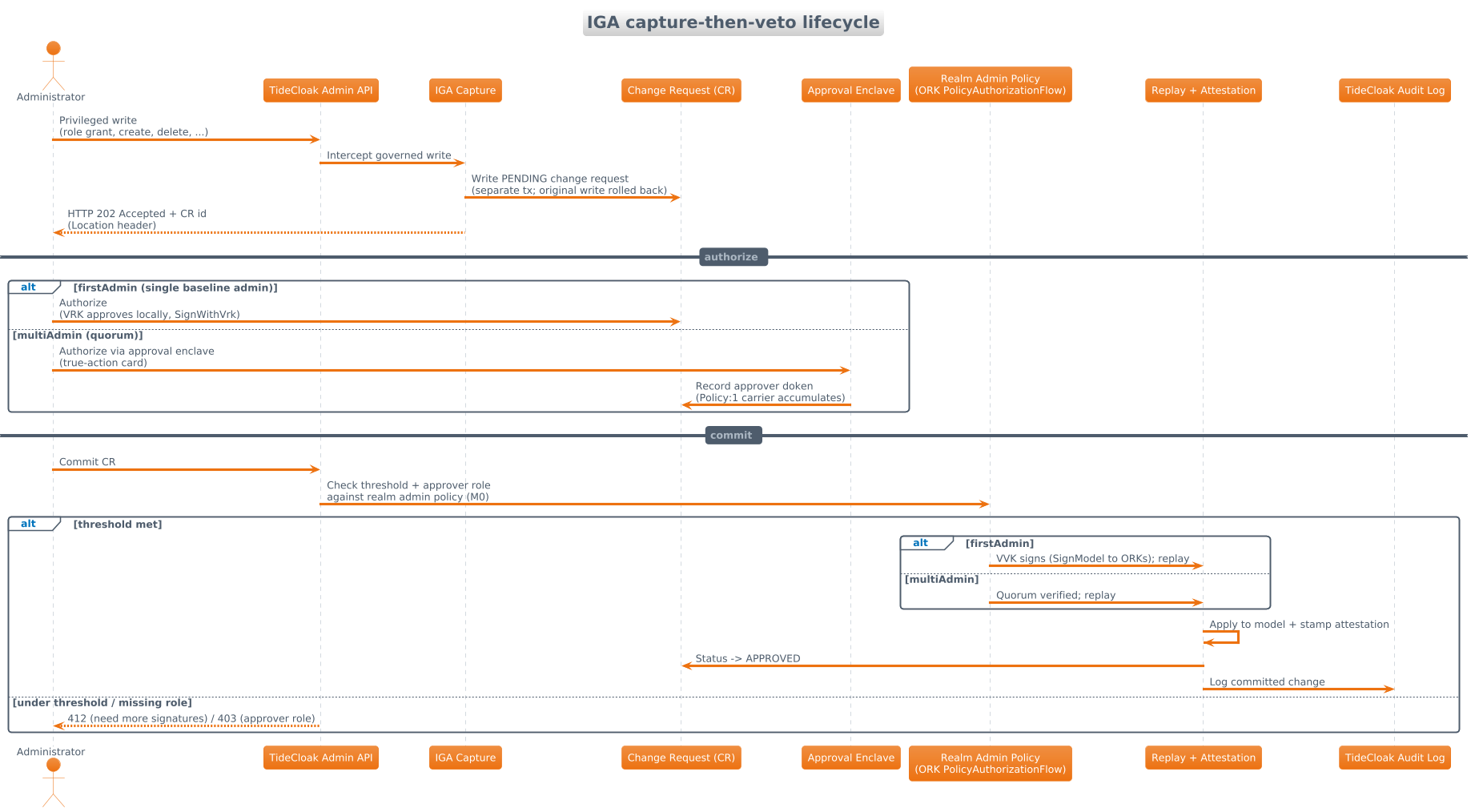
Capture the change request An admin performs a governed write (e.g. update a role, modify a permission). Instead of applying, the action is captured as a PENDING change request (
202 Accepted) and surfaced in the QEA Approvals inbox. -
Review in the enclave Each approver opens the request and reviews the real action in the Tide approval enclave (for example "Delete the app ...", with a destructive-action warning).
-
Authenticate & approve Each admin authenticates and either authorizes or denies the request.
-
Outcome:
-
Authorized (quorum reached):
- TSS signs the change request.
- The system applies the update (roles, permissions, JWT key rotation) and the request becomes
APPROVED. - An entry is created in the audit log.
-
Denied (quorum not reached):
- The request is marked denied or left pending for further review.
- It is logged in the audit log with reasons.
- Optionally, the change can be revised and resubmitted.
-
End-to-end governance flow
The diagram below shows the full path a QEA realm takes, from provisioning through to a governed change being applied. Provisioning is a one-time setup that stands up the realm, its Tide keys, and the first admin. After that, every governed write follows the same loop: it becomes a change request, it waits in the QEA Approvals inbox, and it is applied only once approvals reach quorum. This is why no single write applies immediately and why sub-quorum commits are refused with 412 QUORUM_NOT_MET.
Authorize vs Commit
TideCloak exposes two actions on a change request:
- Authorize records your approval and auto-commits once approvals reach quorum. This is what you normally use.
- Commit applies a request that has already reached quorum. Below the threshold it returns
412 QUORUM_NOT_MET.
Detailed Sequence Diagram
Audit & Accountability
- Every step (capture, approval, signature) is logged with timestamps, admin identities, and cryptographic proofs.
- Audit trails support compliance and forensic analysis without exposing secrets.
Integration with Keycloak
Tide's QEA layer integrates seamlessly with Keycloak's admin REST API and the tide-console. It intercepts changes to sensitive endpoints, adds governance controls, and applies TSS‑based signing before committing alterations.
Benefits
- Quorum-Enforced Governance: No single point of failure or unauthorized change.
- Tamper‑Proof Authority: Final authority (signing key) reside outside anyone's hand.
- Insider Threat Resistance: Quorum approvals mitigate rogue admin risks.
- Clear Audit Trails: Full visibility into who changed what, when, and how.
- Regulatory Compliance: Meets strict governance requirements out of the box.
Setup: Setting Up and Using Tide QEA.